介绍
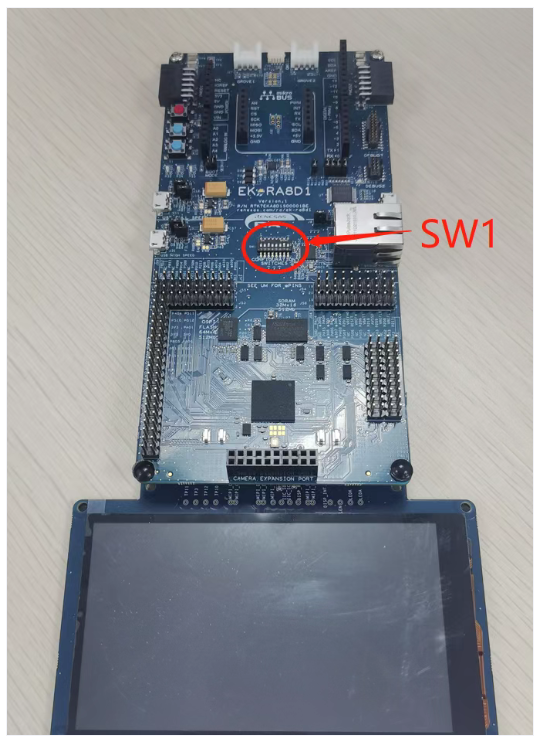
本文介绍由e2 studio自动生成的FSP LVGL pack的使用说明,Pack的生成方法可以参考前面的介绍文章。用户可以通过添加该pack,以可视化的形式添加和配置Little VGL,包括Little VGL的分辨率、色深、DPI以及官方的demo等进行配置。用户不用再做移植Little VGL的源代码,不用再繁琐的添加各个头文件。本次实验所用硬件为EK-RA8D1,如下图。确保板子的SW1-7切换到“ON”
Pack下载链接
软件架构
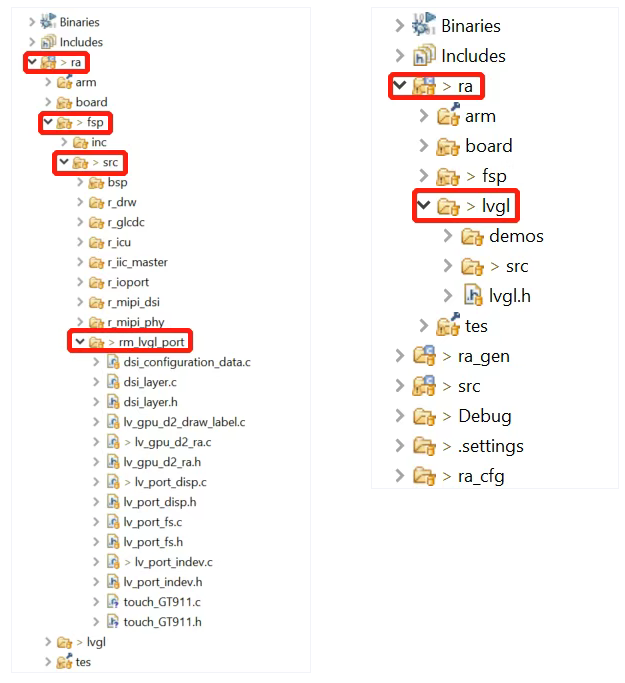
通过pack生成的代码主要在ra→fsp→src→rm_lvgl_prot和ra→lvgl两个路径下
安装教程
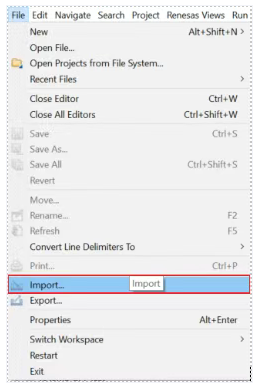
1 打开e2 studio菜单中“File”→“Import... ”
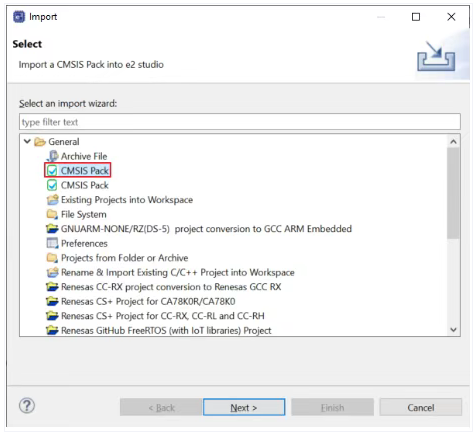
2 在弹出的“Import”对话框中,选择“General”→“CMSIS Pack”,点击“Next”
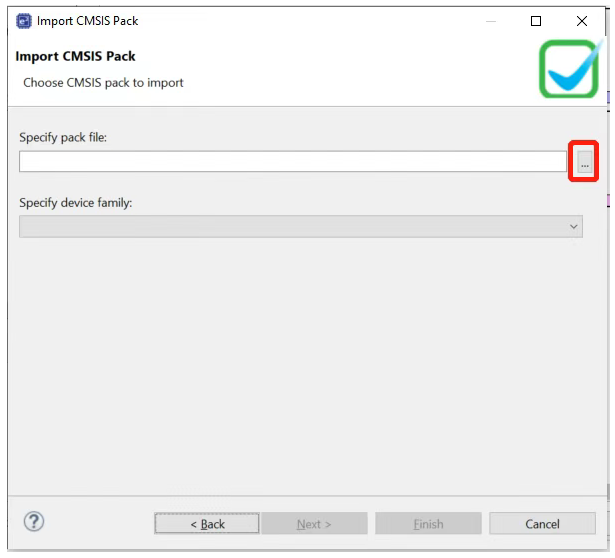
3 在弹出的“Import CMSIS Pack”对话框中,点击“Specify pack file”右侧“...”,指定需要添加的pack文件
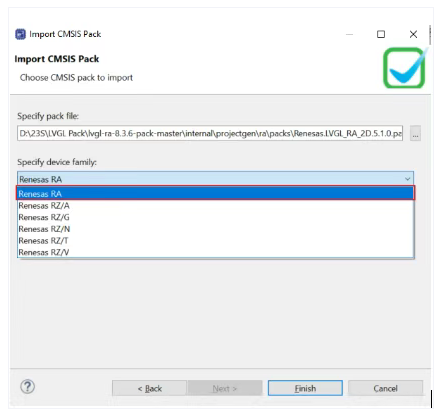
4 “Specify device family”选择“RA”,点击Finish
4 使用说明
重新打开e2 studio
新建工程,新建工程步骤不再赘述,FSP版本选择5.1.0及以上,Board选择EK-RA8D1
新建好工程后,添加LVGL的stack,这时候会提示GLCDC的时钟没有打开,切换到clocks选项卡,enable LCD的clock,选择PLL1P,让LCD时钟输出为240MHz即可。
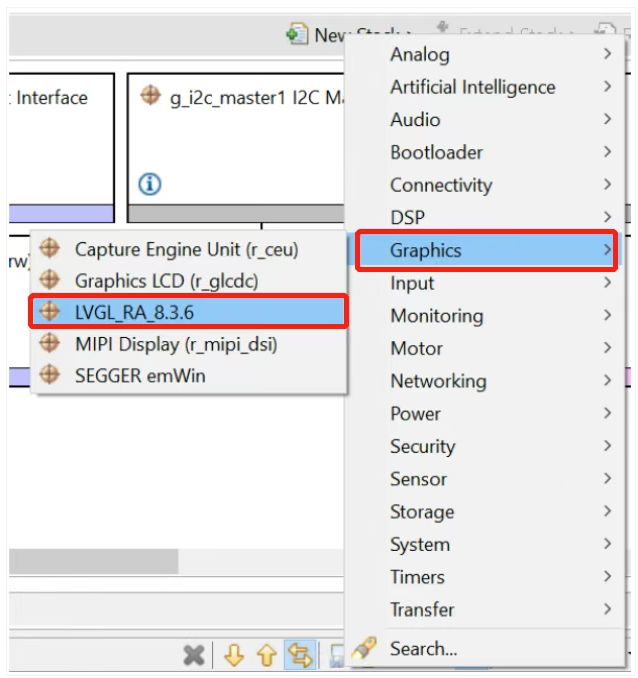
添加MIPI DSI driver,左键点击Add MIPI DSI Output(Optional)→New→MIPI Display(r_mipi_dsi):
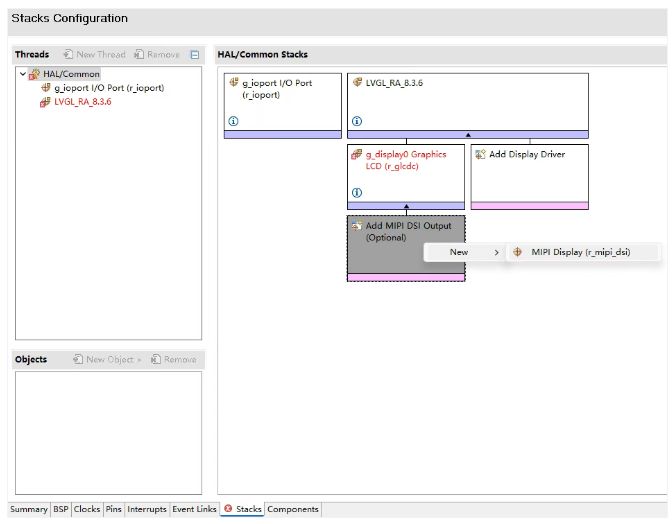
Enable LCD的clock后,r_glcdc的红色提示会消失。
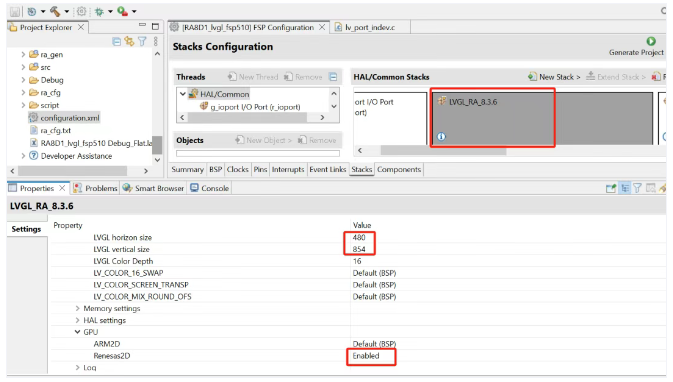
修改LVGL显示分辨率:480*854,enable 2D
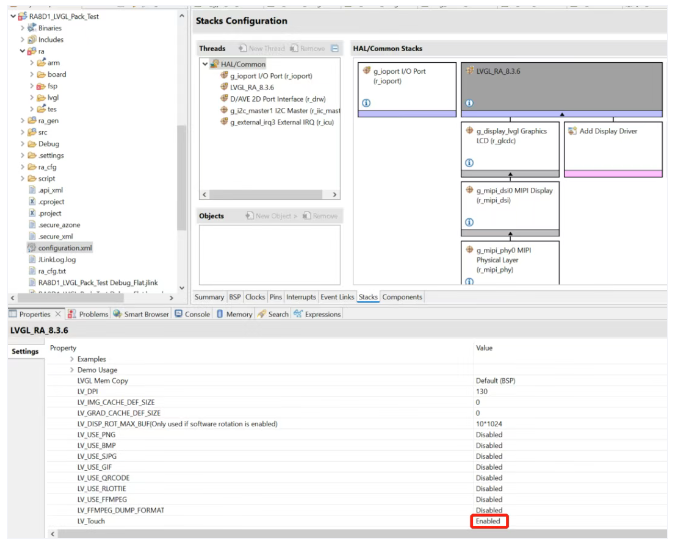
使能touch
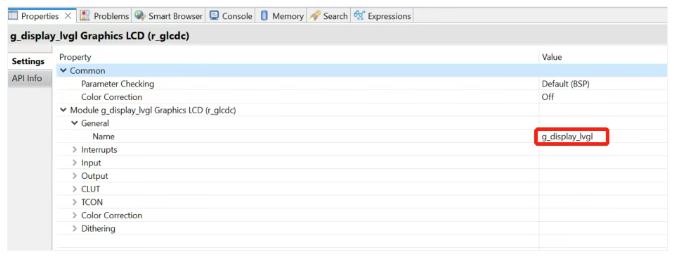
修改glcdc的名字为g_display_lvgl:
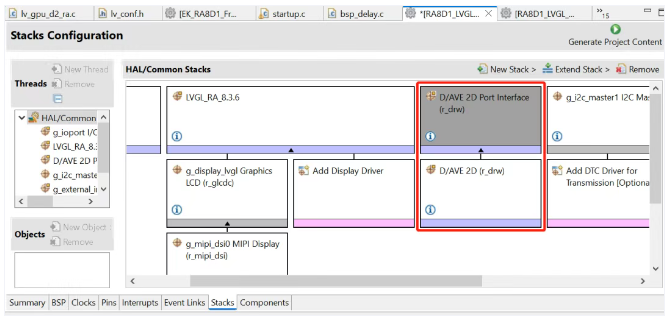
添加2D驱动,如果上述步骤没有enable 2D,此步骤可以跳过。New Stack→Graphics→D/AVE 2D Port Interface
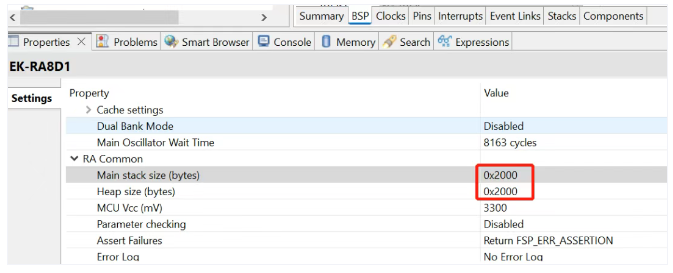
添加完2D stack后,在BSP选项卡中heap给2D使用,同时加大stack的值为0x2000:
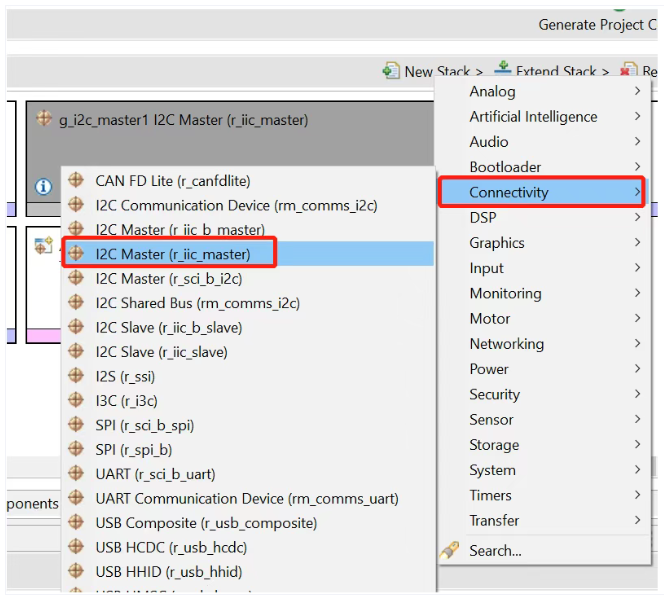
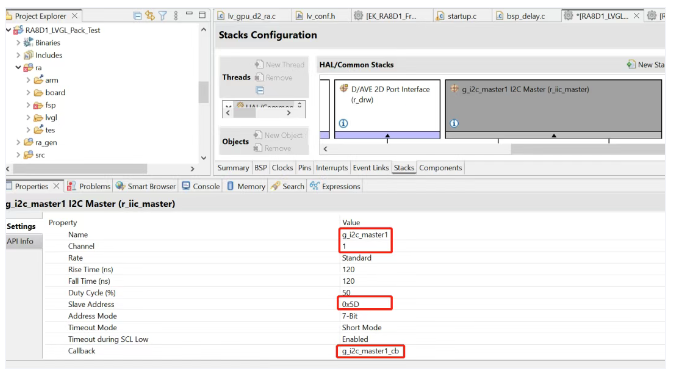
修改I2C的配置,Name: g_i2c_master1, Channel: 1, Slave address: 0x5D, Callback: g_i2c_master1_cb, Interrupt Priority Level:Priority 12
添加GPIO中断,修改irq的配置:Name:g_external_irq3,Channel:3,Callback:touch_irq_cb
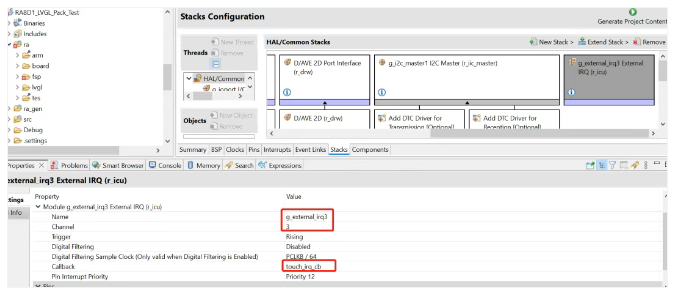
P510设为input模式,IRQ选择为IRQ3
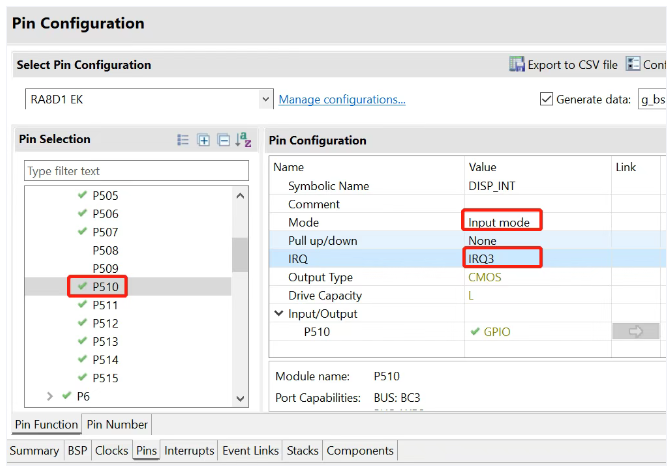
配置引脚,改变SDRAM的引脚驱动能力:PA00 -- H, PA08 -- H, PA09 -- HH, PA10 -- H, P404设为输出模式,初始化为高电平,PA01设为输出模式,初始化为高电平
点击Generate Project Content,生成代码
添加应用代码,做一个LVGL下拉控件。修改 hal_entry.c如下:
#include "hal_data.h"
#include "dsi_layer.h"
#include "lvgl.h"
#include "lv_demos.h"

FSP_CPP_HEADERvoid
R_BSP_WarmStart(bsp_warm_start_event_t event);
FSP_CPP_FOOTER

#define RGB_565_REG    (0x1F << 11)
#define RGB_565_GREEN  (0x3F << 5)
#define RGB_565_BLUE   (0x1F << 0)

/* Global variable to keep track of requested application */
void SysTick_Handler(void);
#define LVGL_TICK_MS 1Ustatic
volatile uint32_t s_tick        = 0U;
static volatile bool s_lvglTaskPending = false;
#define LVGL_TASK_PERIOD_TICK 3Ustatic
void DEMO_SetupTick(void)
{
    if (0 != SysTick_Config(SystemCoreClock / (LVGL_TICK_MS * 1000U)))
    {
        while (1);
    }
}

void SysTick_Handler(void)
{
    s_tick++;
    lv_tick_inc(LVGL_TICK_MS);

    if ((s_tick % LVGL_TASK_PERIOD_TICK) == 0U)
    {
        s_lvglTaskPending = true;
    }
}

#if LV_BUILD_EXAMPLES

static void event_handler(lv_event_t * e)
{
    lv_event_code_t code = lv_event_get_code(e);
    lv_obj_t * obj = lv_event_get_target(e);
    if(code == LV_EVENT_VALUE_CHANGED)
    {
        char buf[32];
        lv_dropdown_get_selected_str(obj, buf, sizeof(buf));
        LV_LOG_USER("Option: %s", buf);
    }
}

void lv_example_dropdown_1(void)
{

    /*Create a normal drop down list*/
    lv_obj_t * dd = lv_dropdown_create(lv_scr_act());
    lv_dropdown_set_options(dd, "Apple\n"
            "Banana\n"
            "Orange\n"
            "Cherry\n"
            "Grape\n"
            "Raspberry\n"
            "Melon\n"
            "Orange\n"
            "Lemon\n"
            "Nuts");

lv_obj_align(dd, LV_ALIGN_TOP_MID, 0, 20);
lv_obj_add_event_cb(dd, event_handler, LV_EVENT_ALL, NULL);
}
#endif
/*******************************************************************************************************************//**
 * main() is generated by the RA Configuration editor and is used to generate threads if an RTOS is used.
 * This functionis called by main() when no RTOS is used.
 * **********************************************************************************************************************/
void hal_entry(void)
{

    /* TODO: add your own code here */
    fsp_err_t  err;
    /* Fill the Frame buffer with Blue, to zero out info from previous execution runs */
    uint32_t count;

    uint16_t * p = (uint16_t *)&fb_background[0][0];
    for (count = 0; count < sizeof(fb_background)/2; count++)
    {
        *p++ = RGB_565_REG;}
    }

DEMO_SetupTick();
lv_init();

lv_port_disp_init();
#if Touch_Enablelv
port_indev_init();
#endif

lv_example_dropdown_1();
#if LV_USE_DEMO_WIDGETS
//       lv_demo_widgets();
#endif

#if LV_USE_DEMO_STRESS
lv_demo_stress();
#endif
#if LV_USE_DEMO_BENCHMARK
lv_demo_benchmark();
#endif
#if LV_USE_DEMO_MUSIC
lv_demo_music();
#endif
//    lv_task_handler();
/* handle the tasks of LVGL */
while(1)
{
    while (!s_lvglTaskPending)
    {}
    s_lvglTaskPending = false;
    lv_task_handler();
}


#if BSP_TZ_SECURE_BUILD
/* Enter non-secure code */
R_BSP_NonSecureEnter();
#endif
}

/*******************************************************************************************************************//**
 * This function is called at various points during the startup process.  This implementation uses the event that is
 * called right before main() to set up the pins.
 *
 * @param[in]  event    Where at in the start up process the code is currently at
 **********************************************************************************************************************/
void R_BSP_WarmStart(bsp_warm_start_event_t event)
{
    if (BSP_WARM_START_RESET == event)
    {
#if BSP_FEATURE_FLASH_LP_VERSION != 0

        /* Enable reading from data flash. */
        R_FACI_LP->DFLCTL = 1U;

        /* Would normally have to wait tDSTOP(6us) for data flash recovery. Placing the enable here, before clock and
         * C runtime initialization, should negate the need for a delay since the initialization will typically take more than 6us. */
#endif
    }

    if (BSP_WARM_START_POST_C == event)
    {
        /* C runtime environment and system clocks are setup. */

        /* Configure pins. */
        R_IOPORT_Open (&IOPORT_CFG_CTRL, &IOPORT_CFG_NAME);

#if BSP_CFG_SDRAM_ENABLED

        /* Setup SDRAM and initialize it. Must configure pins first. */
        R_BSP_SdramInit(true);
#endif
    }
}

#if BSP_TZ_SECURE_BUILD

FSP_CPP_HEADER
BSP_CMSE_NONSECURE_ENTRY void template_nonsecure_callable ();

/* Trustzone Secure Projects require at least one nonsecure callable function in order to build (Remove this if it is not required to build). */
BSP_CMSE_NONSECURE_ENTRY void template_nonsecure_callable ()
{

}
FSP_CPP_FOOTER

#endif
编译,下载到EK-RA8D1,连接MIPI屏,会得到以下结果:
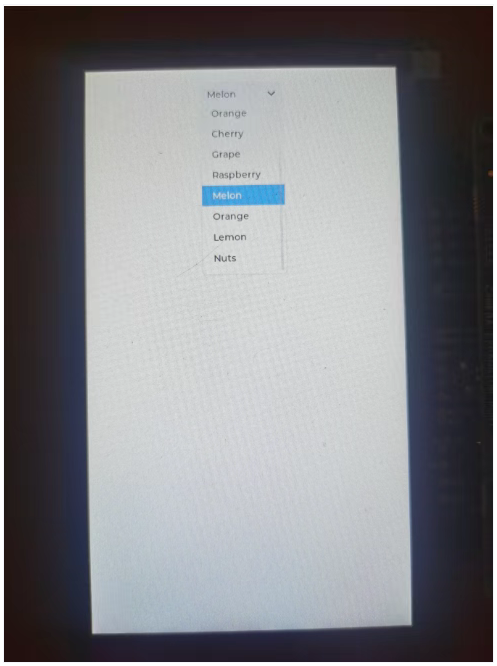
编译,下载到EK-RA8D1,连接MIPI屏,会得到以下结果:
编译,下载到EK-RA8D1,连接MIPI屏,会得到以下结果:
#include "hal_data.h"
#include "dsi_layer.h"
#include "lvgl.h"
#include "lv_demos.h"

FSP_CPP_HEADER
void R_BSP_WarmStart(bsp_warm_start_event_t event);
FSP_CPP_FOOTER

#define RGB_565_REG    (0x1F << 11)
#define RGB_565_GREEN  (0x3F << 5)
#define RGB_565_BLUE   (0x1F << 0)

/* Global variable to keep track of requested application */
void SysTick_Handler(void);
#define LVGL_TICK_MS 1U
static volatile uint32_t s_tick        = 0U;
static volatile bool s_lvglTaskPending = false;
#define LVGL_TASK_PERIOD_TICK 3U
static void DEMO_SetupTick(void)
{
    if (0 != SysTick_Config(SystemCoreClock / (LVGL_TICK_MS * 1000U)))
    {
        while (1);
    }
}

void SysTick_Handler(void)
{
    s_tick++;
    lv_tick_inc(LVGL_TICK_MS);
    if ((s_tick % LVGL_TASK_PERIOD_TICK) == 0U)
         {
            s_lvglTaskPending = true;
         }
}

 #if LV_BUILD_EXAMPLES

 static void event_handler(lv_event_t * e)
 {
     lv_event_code_t code = lv_event_get_code(e);
     lv_obj_t * obj = lv_event_get_target(e);
     if(code == LV_EVENT_VALUE_CHANGED)
     {
         char buf[32];
         lv_dropdown_get_selected_str(obj, buf, sizeof(buf));
         LV_LOG_USER("Option: %s", buf);
     }
 }

 void lv_example_dropdown_1(void)
 {
    /*Create a normal drop down list*/
     lv_obj_t * dd = lv_dropdown_create(lv_scr_act());
     lv_dropdown_set_options(dd, "Apple\n"
                                "Banana\n"
                                "Orange\n"
                                "Cherry\n"
                                "Grape\n"
                                "Raspberry\n"
                                "Melon\n"
                                "Orange\n"
                                "Lemon\n"
                                "Nuts");

    lv_obj_align(dd, LV_ALIGN_TOP_MID, 0, 20);
    lv_obj_add_event_cb(dd, event_handler, LV_EVENT_ALL, NULL);
 }
 #endif

 /*******************************************************************************************************************//**
  * main() is generated by the RA Configuration editor and is used to generate threads if an RTOS is used.  This function
  * is called by main() when no RTOS is used.
  **********************************************************************************************************************/
 void hal_entry(void)
 {
    /* TODO: add your own code here */
    fsp_err_t  err;
    /* Fill the Frame buffer with Blue, to zero out info from previous execution runs */
    uint32_t count;
    uint16_t * p = (uint16_t *)&fb_background[0][0];
    for (count = 0; count < sizeof(fb_background)/2; count++)
    {
        *p++ = RGB_565_REG;
    }
 }

    DEMO_SetupTick(); //为lvgl提供心跳
    lv_init();
    lv_port_disp_init();
 #if Touch_Enable
    lv_port_indev_init();
 #endif

 //       lv_example_dropdown_1();
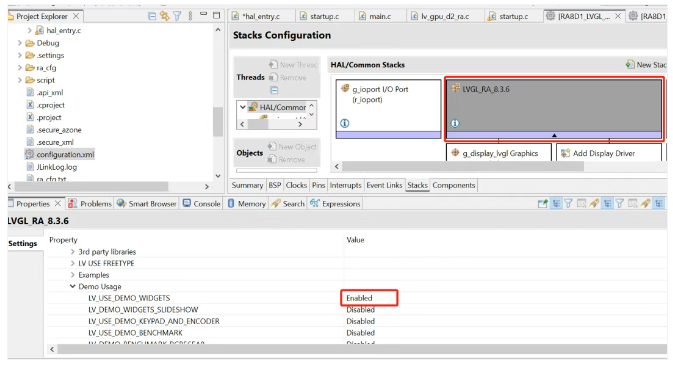
 #if LV_USE_DEMO_WIDGETS
    lv_demo_widgets();
 #endif

 #if LV_USE_DEMO_STRESS
    lv_demo_stress();
 #endif
 #if LV_USE_DEMO_BENCHMARK
    lv_demo_benchmark();
 #endif

 #if LV_USE_DEMO_MUSIC
    lv_demo_music();
 #endif
 //    lv_task_handler();
 /* handle the tasks of LVGL */
    while(1)
        {
            while (!s_lvglTaskPending)
            {
            }
            s_lvglTaskPending = false;
            lv_task_handler();
        }


 #if BSP_TZ_SECURE_BUILD
    /* Enter non-secure code */
    R_BSP_NonSecureEnter();
 #endif
 }

 /*******************************************************************************************************************//**
  * This function is called at various points during the startup process.  This implementation uses the event that is
  * called right before main() to set up the pins.
  *
  * @param[in]  event    Where at in the start up process the code is currently at
  **********************************************************************************************************************/
 void R_BSP_WarmStart(bsp_warm_start_event_t event)
 {
     if (BSP_WARM_START_RESET == event)
     {
 #if BSP_FEATURE_FLASH_LP_VERSION != 0

         /* Enable reading from data flash. */
         R_FACI_LP->DFLCTL = 1U;

         /* Would normally have to wait tDSTOP(6us) for data flash recovery. Placing the enable here, before clock and
          * C runtime initialization, should negate the need for a delay since the initialization will typically take more than 6us. */
 #endif
     }

     if (BSP_WARM_START_POST_C == event)
     {
         /* C runtime environment and system clocks are setup. */

         /* Configure pins. */
         R_IOPORT_Open (&IOPORT_CFG_CTRL, &IOPORT_CFG_NAME);

 #if BSP_CFG_SDRAM_ENABLED

         /* Setup SDRAM and initialize it. Must configure pins first. */
         R_BSP_SdramInit(true);
 #endif
     }
 }

 #if BSP_TZ_SECURE_BUILD

 FSP_CPP_HEADER
 BSP_CMSE_NONSECURE_ENTRY void template_nonsecure_callable ();

 /* Trustzone Secure Projects require at least one nonsecure callable function in order to build (Remove this if it is not required to build). */
 BSP_CMSE_NONSECURE_ENTRY void template_nonsecure_callable ()
 {

 }
 FSP_CPP_FOOTER

 #endif
编译,下载。得到结果如下:
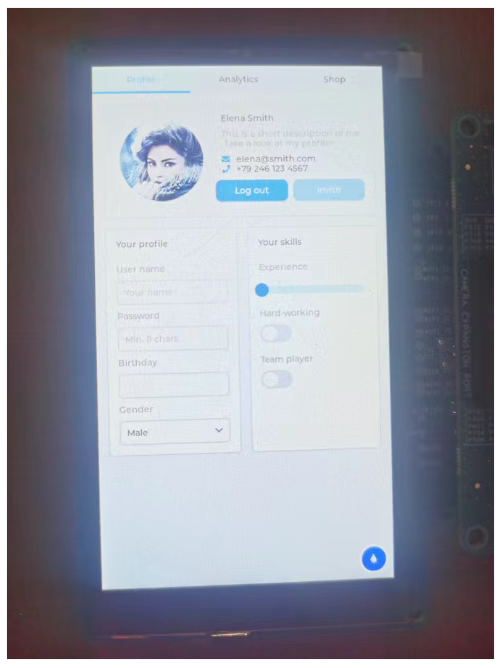
如果实验过程有问题,可以下载本仓库中e2studio_project\下的RA8D1_simple_demo和RA8D1_widgets_demo两个完整的工程做对比。
基于RA8D1的LVGL FSP配置以及使用已经介绍完毕。










 样品
样品 应用
应用 微信
微信
